
Customer feedback & reputation growth
Ask every customer. Learn from every response.
JoltReview helps local businesses ask every customer for honest feedback, give every customer equal access to public review links, and turn customer responses into AI-powered insights.
Honest feedback. Equal review access. AI-powered insights.
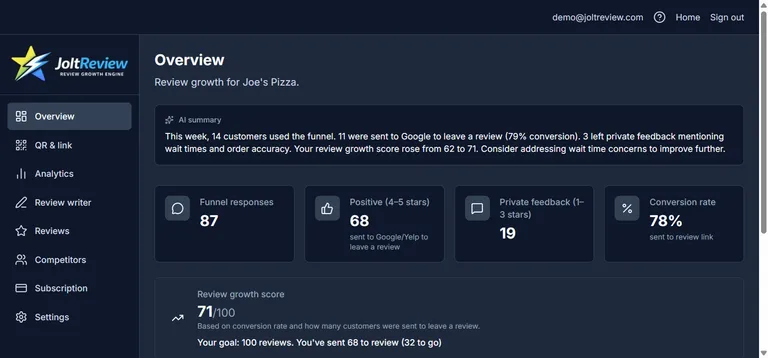
You are only hearing from a fraction of your customers
Customers have opinions after every visit, appointment, job, or purchase. But most businesses only hear from customers when they are extremely happy, extremely upset, or already posting publicly.
JoltReview gives you a simple way to ask every customer for honest feedback, understand what is working, and fix problems before they become patterns.
One QR code. One link. Honest feedback from every customer.
Share your JoltReview link by QR code, receipt, email, SMS, table tent, or checkout page. Customers can rate their experience, leave private feedback, and choose whether they want to share their experience publicly on Google, Yelp, Facebook, or another review platform.
Every customer gets the same public review options — positive, neutral, or negative.
Add your business and public review links
Sign up, enter your business details, and add your Google, Yelp, or other review links. You get a unique feedback link and QR code.
Share your link or QR with customers
Customers tap the link or scan the QR after a real experience. They leave honest feedback and can choose whether to post publicly.
Track feedback and improve
Your dashboard shows customer responses, follow-up tasks, and AI-powered insights so you know what to fix and what to repeat.
Everything you need to collect feedback and grow your reputation
- Honest Review Flow
Ask every customer for feedback and give everyone the same public review options.
- Feedback Inbox
See private customer feedback in one place, organized by rating, location, campaign, tag, and status.
- AI Feedback Insights
Turn customer responses into summaries, themes, trends, and recommended actions.
- Customer Recovery Tasks
Follow up with unhappy customers, assign issues, and track resolution.
- Review Link Manager
Add your Google, Yelp, Facebook, TripAdvisor, or custom review links.
- Campaign Tracking
Create QR codes and links for receipts, counters, emails, SMS, table tents, locations, and team members.
- Customer Review Writer
Help customers draft reviews they can copy and paste to Google or Yelp.
Built for businesses that want the full picture
JoltReview helps you ask every customer for honest feedback, give every customer the same public review options, and use private feedback to improve your business.
More trust, better insight, and a clearer path to earning reviews that reflect real customer experiences.
Turn customer feedback into clear business insights
JoltReview uses AI to help you understand what customers are really saying. See common praise, recurring complaints, location trends, staff mentions, service issues, and recommended next steps.
Instead of reading every response manually, you get a clearer view of what to fix, what to repeat, and what customers value most.
Recover unhappy customers faster
Negative feedback is not the enemy. Ignoring it is. JoltReview helps you spot unhappy customers, assign follow-up tasks, track resolution, and document what happened.
Use feedback to improve the customer experience before the same issue shows up again.
Built for local businesses that depend on trust
JoltReview is made for businesses where reputation matters. If reviews influence whether customers choose you, JoltReview gives you a better way to collect feedback and improve.
Built on trust and transparency
JoltReview is built around a simple principle: every customer should be asked honestly, and every customer should receive the same public review options.
Public reviews should always be optional, voluntary, and based on a real experience with your business.
Common questions
- Does every customer get the same public review options?
- Yes. After submitting feedback, every customer can access the same public review links, regardless of rating.
- How does JoltReview work?
- Customers scan your QR code or open your review link after a real experience. They can rate their experience, leave private feedback, and choose whether to share their experience publicly.
- Can customers leave private feedback without posting publicly?
- Yes. Customers can leave private feedback and decide not to post a public review. Leaving a public review should always be optional.
- Can I try it before paying?
- Yes. Start with a free account and a Premium trial. No credit card required for the trial.
Start earning honest reviews
Ask every customer. Learn from every response. Grow your reputation the right way.
Honest feedback. Equal review access. AI-powered insights.
JoltReview provides customer feedback, review link sharing, reputation management, and AI insight tools for informational and operational purposes only. JoltReview does not guarantee review volume, review ratings, search ranking, platform approval, or business results. Businesses are responsible for following the review policies of Google, Yelp, Facebook, and any other platform they use. JoltReview recommends asking every customer for honest feedback and giving every customer equal access to public review links.